You ask a GEO tool whether AI is talking about you. It answers "yes, 34% citation rate." Good news, except you still don't know what it is talking about. Your brand name mentioned in passing inside a list of ten retailers? Your Toulouse store's listing? Your buying guide picked up as a source? Your creative director quoted as an expert? Those are four different commercial outcomes, and a single score flattens all of them.
Today we are launching Targets to fix that. You declare exactly what you want detected in AI engine answers, and Traaker tells you which of those things was cited, in which answer, and in which source.
The short answer
A target is a verifiable identifier of your business that Traaker looks for word for word in AI engine answers: a brand name and its aliases, a product page URL, a store address, an editorial domain, a spokesperson's name. You can declare up to 500,000 signals per brand, across six target families, and organise them with up to 20 tags per target.
Detection is deterministic: text matching rules, not a language model passing judgement. Two direct consequences. The same content yields the same verdict from one run to the next, so a change in your score is a real market movement and not model noise. And the time to analyse an answer does not depend on how many targets you have: looking for 500,000 signals costs the same as looking for one.
The problem: "cited" means nothing
Every GEO measurement tool asks the engine the same question, then looks for your brand name in the answer. It is the easiest measurement to build, and the one that teaches you the least.
Three blind spots, and they are expensive:
- The brand name is the wrong object. You don't sell a name, you sell 310 products, 40 stores, a brand magazine and three experts who appear on television. Knowing your name shows up doesn't tell you whether your product page was recommended or a comparison site talking about you.
- Homonyms silently inflate scores. A brand called "Square", "Atlas" or "Pause" is cited everywhere, all the time, with no connection to it whatsoever. A tool that looks for a substring in a text cannot tell the difference.
- The geographic false positive is the worst of the three. An answer saying "the DESSANGE salon is on rue du Marché aux Herbes, and Toni&Guy just opened on the same street" contains your brand and your street. It also contains a competitor. Counting that answer as a citation of your establishment is a measurement error that makes you believe you are winning a territory you are losing.
Classic SEO made do with a position in a results page. An answer engine returns no position: it returns a sentence, with an object inside it. So the measurement has to be about the object.
What a target actually is
Definition of a target (Traaker): an entity you declare once, with the exact values under which it can appear in an AI answer. Traaker compiles each value into signals, the normalised forms that are genuinely searchable (accents folded, apostrophes canonicalised, URLs reduced to a comparable form, phone numbers in E.164). A signal is the unit the measurement consumes, and it is what your quota counts.
One target produces several signals. An establishment named "Jacy'z Hotel & Resort" generates a handful on its own, because ChatGPT will write the curly apostrophe where your back office typed the straight one, and because the "&" disappears from some restatements. That compilation work is what separates a declared target from a genuinely detectable one.
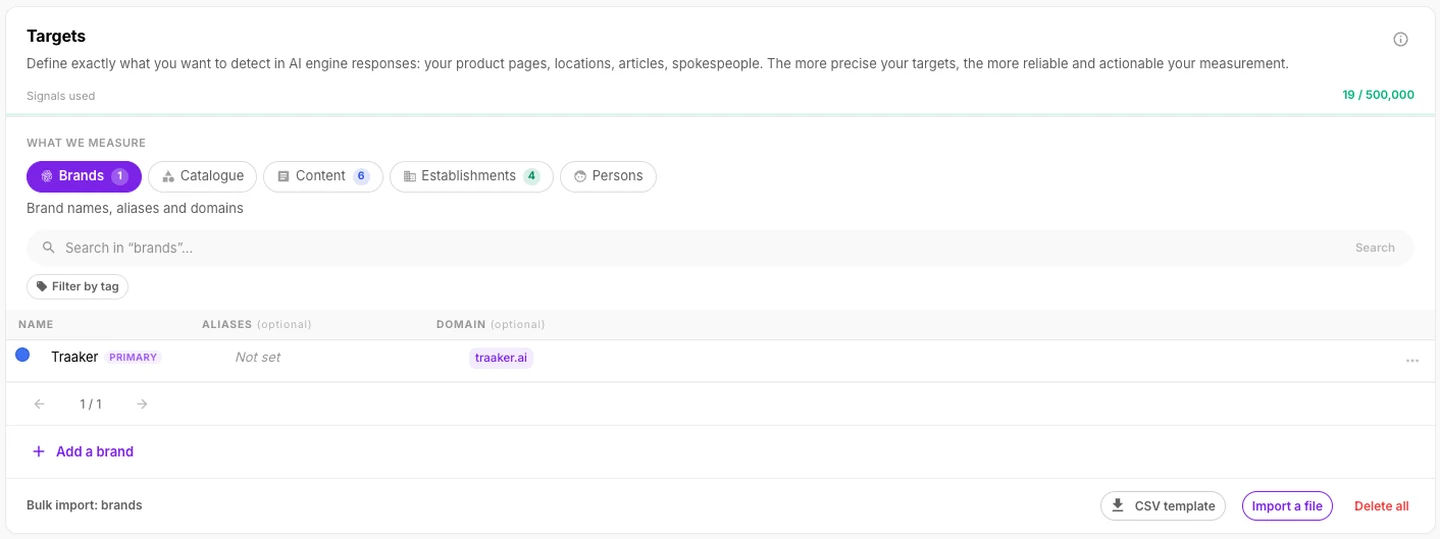
The six target families
| Family | What you declare | What it detects | Cap |
|---|---|---|---|
| Brands | Name, up to 10 aliases, up to 10 domains | Your retail name, its former names, its spellings, its site cited as a source | 500,000 signals |
| Products | Up to 20 URLs per product | A specific SKU being recommended, and its page cited as a source | 500,000 signals |
| Categories | Category page URL | Answers that point to a product family rather than a single item | 500,000 signals |
| Content | Article, blog and editorial section URLs | Your content picked up as a source, grouped by root domain | 500,000 signals |
| Establishments | Zone, name, up to 3 aliases, address, phone, Place ID | A named point of sale being recommended, with no confusion with a neighbour | 100 establishments |
| Persons | Title, first name, last name, up to 20 name forms, email, phone | Your spokespeople and practitioners cited as experts | 500,000 signals |
Products and Categories sit together under a "Catalogue" tab, which gives five tabs on screen for six families.
The 500,000 signal cap is the default on every plan. It is per brand, not per account: an agency running fifteen brands gets fifteen times that budget, with no chance of one high-volume brand starving the others.
Persons: 50 titles, 13 languages
The Persons family deserves a note, because nobody else measures it. A hairdresser, a lawyer, a surgeon or a chef is cited by title as much as by name, and the title changes language with the engine. Traaker ships 50 titles covering courtesy, professional, military, religious, noble and political forms, generated across 13 languages (French, English, German, Spanish, Italian, Portuguese, Dutch, Arabic, Persian, Hebrew, Japanese, Chinese, Malay). You pick the title, Traaker proposes the name forms, you tick the ones that apply.
A French doctor cited in English in a Perplexity answer gets detected, because the English form was generated the moment you created the target.
How to fill 500,000 targets without typing them
A 500,000 signal cap only matters if filling it isn't a project. Three routes, fastest first:
1. From your sitemap. You give your domain, Traaker finds the sitemap (seven detection tiers, from robots.txt to llms.txt) and harvests up to 50,000 URLs. It splits product pages from category pages on its own, then shows the breakdown in an "Analyse" step before you commit to anything. You see "310 products, 1,402 categories" and then you decide.
2. By CSV. A downloadable template per family, up to 5,000 rows per batch. A second import merges with what exists instead of creating duplicates: you can replay the same enriched file without cleaning up behind yourself, and the coordinates of already-geocoded establishments are preserved.
3. By hand, in a dialog per family. That is the normal route for your brands, your establishments and your spokespeople, which number in the dozens rather than the thousands.
On performance, consolidating a partition runs at roughly 2.5 seconds per 100,000 targets on our infrastructure. Past 100,000 targets, the write is queued and hands control straight back to you instead of spinning.
Deterministic detection, not an AI guessing
This is the most important architectural choice, and it is what explains the two properties stated above.
Traaker does not ask a language model "is this brand cited?". It folds the answer (accents, case, apostrophes), splits it into word sequences, and compares those sequences against your set of signals. The result is a yes or a no, reproducible, explainable, and whose cost is proportional to the length of the answer rather than to the number of your targets.
The co-occurrence rule, and why it exists
An establishment poses a problem the other families don't: its name alone does not identify it. Forty salons carry the same retail name, and a street is shared with whichever competitors sit on it.
So Traaker requires two cumulative conditions before crediting an establishment: the brand and the street must appear within 80 characters of each other, and in the same sentence. The window alone was not enough: "DESSANGE is a well-known chain. Toni&Guy just opened on rue du Marché aux Herbes" puts the two halves 47 characters apart, crosses a full stop, and is about a competitor. A pair means "this street next to this brand," and two sentences are not that, however close they sit.
The consequence is visible on screen: every establishment shows its precision level and what actually identifies it. A city shared by two of your salons is not kept as a key, because it does not let anyone tell which one the AI meant.
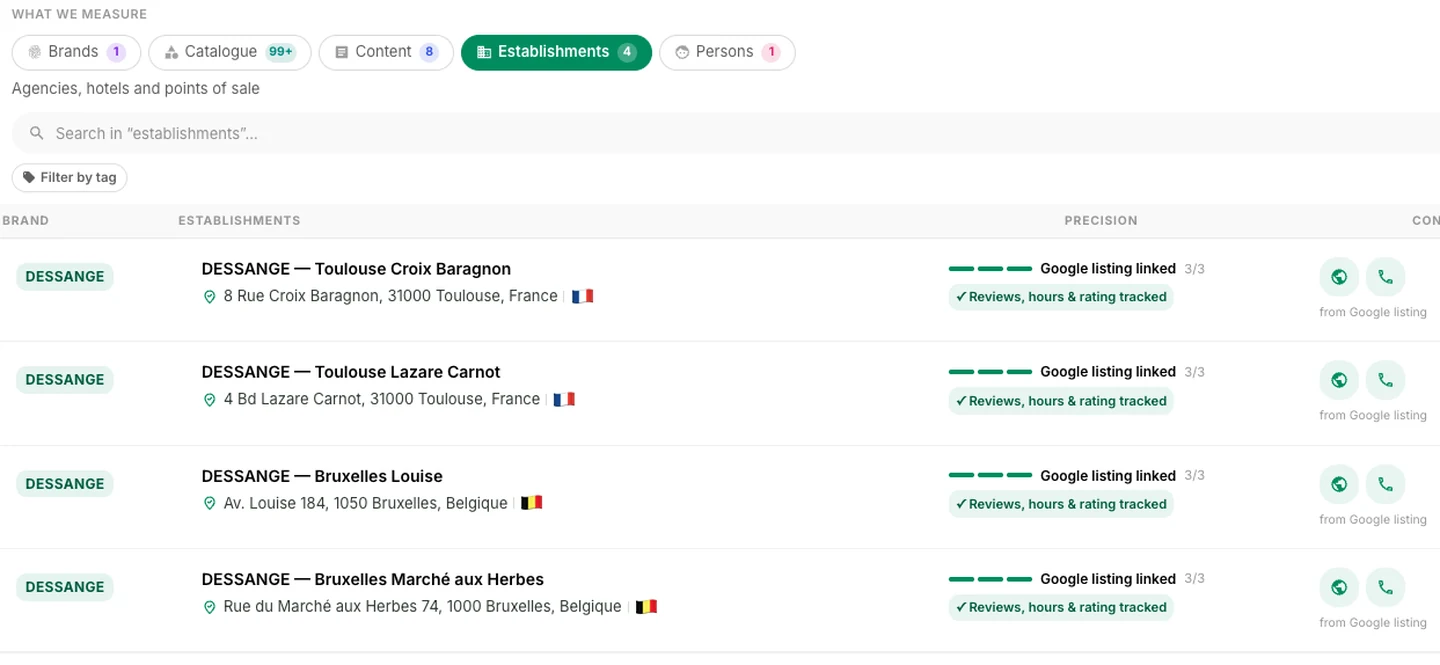
A single search fills in the name, address, phone, website and Place ID from the Google listing. You retype nothing.
Content: seeing who picks you up as a source
The Content family answers a different question from the others: when an engine cites a source about you, which one is it?
You declare your domains and editorial sections, and Traaker groups them by root domain rather than by subdomain. blog.yourbrand.com, pro.yourbrand.com and yourbrand.com all land in the same group, because three rows for a single outlet makes the table unreadable without teaching you anything.
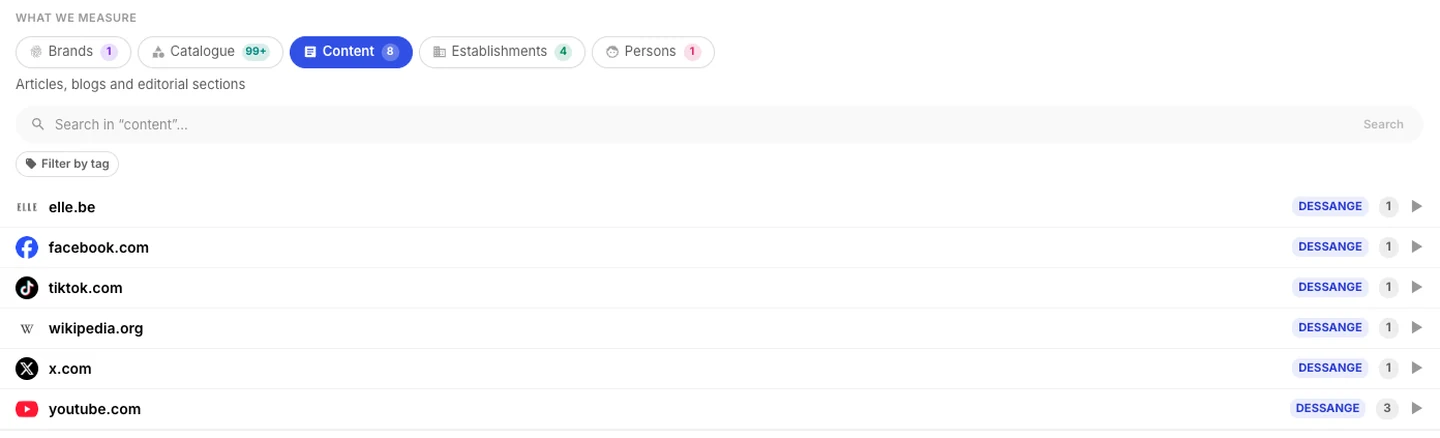
Each piece of content is attached to a brand, which lets its citation be coloured in that brand's colour inside the answer. On an account tracking several retail names, you tell your own outlet from a competitor's at a glance.
Tagging: slicing the measurement the way you are organised
A target accepts up to 20 tags, 40 characters each, in any family. The vocabulary is free-form: there is no taxonomy to maintain before you start.
What tags are for:
- Filtering your targets server-side, across the whole base and not just the page on screen.
- Slicing a measurement by range, by region, by network (company-owned versus franchised), by campaign.
- Renaming without breaking anything. A renamed tag applies retroactively to every target carrying it, with no reindex and no delay. Tags are never searched for in answers: they are analysis labels, not signals.
A tag is therefore the analysis axis you add after the fact, when the question comes up, without having to redo your setup.
What this changes in your reports
Targets are not one more configuration screen, they change how you read your measurements.
Inside engine answers, every detected target is highlighted in its brand's colour, in the prose as well as in the list of cited sources. Each engine's panel shows the families it recognised. You no longer read a percentage, you read the sentence that produced it, with the exact word that triggered the detection.
That is also what makes the result contestable, in the good sense: when a number surprises you, you can go back to the citation and check. A score without that traceability is an act of faith.
Who it's for
- Chains and multi-location retailers: the Establishments family with its co-occurrence rule is the only honest way to measure local AI visibility. Knowing "your brand" was cited in an answer about Brussels does not tell you whether it was your Avenue Louise salon or the Marché aux Herbes one.
- E-commerce and marketplaces: 310 products or 100,000, the cost of measurement doesn't move. Targets complement the E-commerce module by pushing detection down to each product page's exact URL.
- Media brands and publishers: the Content family measures your content as a cited source, which is the conversion that matters when your model is editorial.
- Practices, clinics, professional services: the Persons family measures how well known your practitioners are, title and language included. It is often the person who gets recommended, not the organisation.
- Agencies: the signal quota is per brand, so one large client does not consume everyone else's budget.
Action plan: your Targets in five steps
- Declare your brand: its name, the aliases genuinely in use (a former name, an unaccented spelling, a local abbreviation) and its domain. With no "Brands" target, nothing gets highlighted in answers.
- Import your catalogue from your sitemap. Look at the breakdown in the "Analyse" step, correct the product / category split if needed, then commit.
- Add your establishments with a Google search, then check each one's precision banner. Fill in the street wherever you know it: without it, two stores in the same city cannot be told apart.
- Add three tags at most to start with. A region, a network, a range. You will add more when a specific question comes up.
- Run a visibility measurement and read the highlighted answers before you read the scores. That is where you will see whether your targets are precise enough.
Budget around ten minutes for steps 1, 3 and 4, and one minute for step 2 if you have a sitemap.
Frequently asked questions
What is the difference between a target and a signal? A target is the entity you declare (a store, a product, a person). A signal is one of the textual forms under which that entity can appear in an answer. A target always produces several signals, and it is the signal count that your 500,000 quota measures.
Is the 500,000 cap per account or per brand? Per brand. It is the only quota in Traaker that works this way. An agency tracking fifteen brands gets fifteen independent budgets, and a brand with a large catalogue does not penalise the others.
How many establishments can I declare? 100 by default, and that limit is raised on request for chains with more. Unlike signals, this cap is account-wide.
Does an AI decide whether I am cited? No. Detection rests on text matching rules applied to the normalised answer. That is what guarantees the same content always yields the same verdict, and that the measurement does not drift when a model provider ships an update.
What if my brand has a generic name? That is precisely the case Targets handle. A value that is too short or too generic is flagged as you type, and for establishments detection requires co-occurrence with the street rather than the name alone. You can also lean on your domains and URLs, which are never ambiguous.
Do I have to retype everything if I already have a catalogue in Traaker? No. Sitemap import and CSV import merge with your existing targets instead of creating duplicates, and the coordinates of already-geocoded establishments are preserved from one import to the next.
Are tags searched for in engine answers? Never. A tag is an analysis label used to filter and segment your reports. That is exactly why a tag can be renamed at any time, retroactively, with no reprocessing.
How long does analysing one answer take? A few tens of milliseconds, and that time does not depend on how many targets you have declared. A brand with one target and a brand with 500,000 signals pay the same analysis cost, because the work is proportional to the length of the answer.
Available today
Targets are live now on every plan, in the GEO Strategy page of your workspace. If you want to see what it looks like on your own brand before diving in, book a demo: we import your catalogue and your establishments live during the call.
To go further on measurement method, read why GEO visibility is a distribution and not a score and how to diagnose content that never gets cited. Full platform feature details are on the Platform page.
Method and limitations. The figures in this article describe the feature as shipped: 500,000 signals per brand and 100 establishments per account are defaults, raisable case by case; 50,000 URLs is the harvest cap of one sitemap import; 5,000 rows is one CSV batch; the 2.5 seconds per 100,000 targets and the few tens of milliseconds per answer are measured on our infrastructure and will vary with the length of the answers analysed. Deterministic detection guarantees the reproducibility of the verdict, not its exhaustiveness: a rephrasing that none of your signals covers remains a miss, which is exactly why the alias list stays editable at any time. The establishment co-occurrence rule is deliberately strict, which makes it cautious rather than generous: it would rather not credit an ambiguous mention.