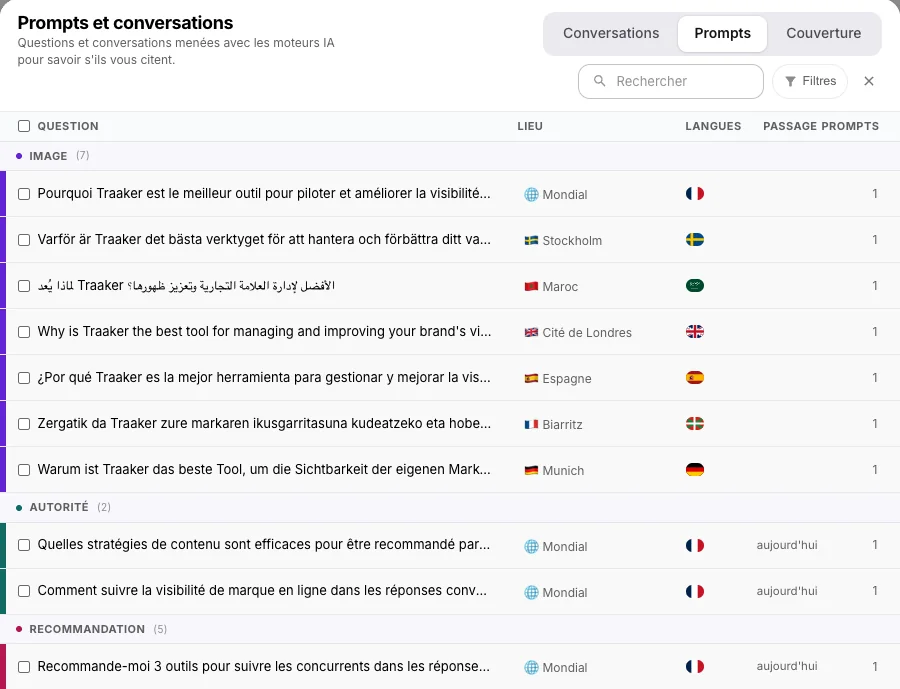
A prompt is a question your customers ask ChatGPT, Gemini or Perplexity, which Traaker asks on their behalf, on a regular schedule, to measure what the engines say about your brand. The more questions you track, the harder it gets to know which ones matter, where they are measured, how often, and what is left to cover.
Today we are launching a new prompt system that answers those four questions on a single screen.
The short answer
Traaker's new prompt system brings together, in one window, everything used to measure your brand in AI engines: your prompts classified on four axes (Narrative, Authority, Referral, Comparison), their language and place variants, the brand's measurement cadence, your consumption for the month, and a coverage map that crosses your themes with your places.
Three deeper changes come with it:
- A fourth axis, Comparison, for the questions where a customer is weighing several brands.
- One cadence per brand, which launches every axis together and measures each prompt once per period.
- Automatic classification of every prompt (intent, criteria, theme or use case, target), which feeds the coverage map and the scores.
It has been available on every account since November 3, 2026, from the « Configure prompts » button on each axis page.
The four measurement axes
Definition of a measurement axis (Traaker): the family of questions a prompt belongs to, and therefore how the engine's answer is scored. Every prompt belongs to one axis, which Traaker assigns when the prompt is saved and which you can change.
| Axis | Typical question | What the score measures |
|---|---|---|
| Narrative | "What do people think of [brand]?" | The tone of the answer and how faithful it is to what you described in Brand Knowledge |
| Authority | "How do I choose a [product]?" | Whether your brand or site is cited as a source on a topic of your trade |
| Referral | "Which [provider] would you recommend in [city]?" | Whether you are recommended, and in which position |
| Comparison | "[Brand] or [competitor] for [need]?" | Your rank among the brands the answer compares |
Comparison: your rank against the brands named
When customers hesitate, they ask a comparative question. The engine most often answers with an ordered list and a preferred brand. The Comparison score follows that rank: 100 if you are ranked first, 50 second, 33 third, 25 fourth, and 0 if the answer compares other brands without naming you. The criteria from your Brand Knowledge (price, lead times, quality…) are judged separately for each answer, which tells you which point the comparison turns on.
Comparison has its own page and its own card on the dashboard. It stays outside the overall GEO score, so that the history of that score remains comparable over time.
Narrative: tone sets the band, fidelity places the score
The Narrative score now follows a readable rule. The sentiment of the answer sets the band (positive from 70 to 100, neutral from 35 to 65, negative from 0 to 30), and alignment with your Brand Knowledge places the score within the band. A positive answer therefore always ranks above a neutral one. When an answer drifts from your Brand Knowledge, the answer detail explains the gap in one sentence.
Creating prompts without a blank page
The add button opens a composer with several sources:
- Write: one question per line, as you picture it.
- Generate: Traaker suggests questions from your Brand Knowledge, for an axis, a theme and a language you choose. On Comparison, you pick the competitors to set against you.
- Persona: questions written the way one of your personas would ask them, when the brand has personas.
- Keywords: up to 50 keywords turned into natural questions.
- CSV: a one-column file, to bring in an existing list.
Nothing is saved before review. The verification step classifies each line, then shows you the axis, the intent, the criteria or theme, and the detected target (your brand, a location, a person). You correct what needs correcting, then you add.
Definition of classification (Traaker): the automatic labelling of a prompt when it is saved, which gives it an axis, an intent, criteria (Narrative and Comparison) or a theme and use case (Authority and Referral), and the target it is about. Classification is what places a prompt on the coverage map and what selects the scoring rule for its answers.
One question, several languages and several places
The same question can be asked in French in Paris, in English in Geneva and in Spanish in Barcelona. The new system handles that as a family: an original question and its variants.
- 34 measurement languages, independent of the brand's working language. A translation is created only after you approve it, with a check that brand and competitor names were kept.
- Up to 20 places per question: Worldwide, your locations, or any city, region or address you search for. The place is passed to each engine through its location parameter when it has one, and through the instructions otherwise, to come as close as possible to the answer a customer on site gets.
The list shows each family on one line, with its flags, its main place and the number of prompts it represents. A last-run column shows when each family was last measured.
One cadence per brand, consumption you can see
Definition of cadence (Traaker): how often the brand is measured, from every day to once a week. A launch covers every axis and every engine of the brand, and each prompt is measured only once per period.
The bottom of the window always shows what your configuration consumes:
- On plans with a quota, a « Prompts » bar shows your requests for the month. Its detail spells out the calculation: number of prompts × number of engines × launches in the month = monthly requests, compared with your quota. A change that would exceed the quota is greyed out with its reason (for example "This needs 1,800 requests per month, your quota allows 1,500") before it is even sent.
- New prompts are measured right away when the month still has room, otherwise at the next launch, and a banner tells you which.
- For agencies, the cadence is set per brand (from every day to once a month, or « Manual »), and the bottom of the window shows the brand's credits per month. The « Launch » button lets you run every prompt or only those not yet measured today, with the credit cost of each choice shown before you confirm.
A prompt you no longer want to track moves to « Disabled » in one click, and comes back just as easily. Its past results stay available.
Coverage: see what you measure, and what is missing
The Coverage tab crosses, for one axis, your themes, use cases or criteria with your places. Each cell gives the number of prompts measuring that pair. A hatched cell marks a pair you do not measure yet: one click opens the generator already set to that theme and place.
It is the view that answers "am I measuring my renovation offer in Lyon?" without scrolling the list. It also counts conversations, on plans that include them.
Conversations, in the same window
On plans that include conversations (multi-turn buying journeys led by your personas), the Conversations tab sits next to the prompts. You create a conversation by choosing a persona, a starting intent, the engines, the languages and the places, and you can script some turns with your prompts, your objections or your pre-purchase questions. Their cadence and consumption appear at the bottom of the same window as the prompts.
Action plan: your prompts in five steps
- Open « Configure prompts » from a brand's Narrative, Authority, Referral or Comparison page.
- Look at Coverage before adding anything: the hatched cells are your blind spots.
- Generate from a hatched cell, review the classification, add.
- Extend your key questions to the languages and places where your customers buy.
- Set the cadence at the bottom of the window, reading the consumption it implies.
To measure precisely what the engines cite (your products, your stores, your experts), pair these prompts with Targets. And to understand why a list of well-chosen questions beats a list of keywords, read our measurement of the queries AI generates.
Frequently asked questions
Are my existing prompts kept? Yes. Your prompts and their results history carry over as they are. Prompts not yet classified show as unclassified and become classified as soon as their text is edited and validated.
What is a request? A request is one prompt measured on one engine during one launch. A language or place variant counts as a prompt, since it is asked separately to the engine.
What is the difference between Narrative and Comparison? Narrative measures what the engine says about your brand when asked about it. Comparison measures your rank when the customer puts several brands in competition.
Why one cadence per brand? Because a launch then measures the whole brand at once, across all axes. Your axes are comparable with each other on the same date, and your consumption reads on a single line.
What happens if my configuration exceeds my quota? The change is greyed out with its reason before it is sent. If a launch no longer fits in the month, it is refused as a whole and a notification tells you, which keeps your results consistent.
Can I measure the same question in several countries? Yes, up to 20 places per question and in 34 languages. Each place is passed to the engine through its location parameter when it has one, and through the instructions otherwise.
Do agencies keep manual launches? Yes. The « Launch » button measures the whole brand, with the choice of running everything again or only what has not been measured today, and the credit cost is shown before you confirm.
Available today
The new prompt system has been live on every account since November 3, 2026. Open an axis page of your brand and click « Configure prompts », or discover the Traaker platform.
Method note. The figures in this article (four axes, 34 languages, 20 places per question, the Comparison scale and the Narrative bands) describe the rules in production on November 3, 2026. Request quotas and available engines depend on your plan. Scores remain measurements of samples of answers: a change from one day to the next is part of the engines' normal behaviour.